
If you work with multiple SPARQL endpoints, you've undoubtedly faced the challenge of tracking down a specific IRI. You know the drill: opening each endpoint, running a SELECT or ASK query, and hoping for a positive result. This manual, time-consuming process is not only inefficient but also prone to error.
That's why we've introduced a new feature in the RDF and SPARQL plugin that automates this entire workflow. Now, you can find a given IRI across all your registered SPARQL endpoints with a single click, saving you valuable time and effort.
How to find an IRI in your SPARQL endpoints
The new feature is available as a new action button with a search icon in the SPARQL Endpoint Tool Window. Simply click the button, provide an absolute IRI or a prefixed name, and click Search. As soon as the results are ready, the Find Tool Window will open, showing you exactly where your IRI was found.
You can track the progress of the search in your JetBrains IDE's Status bar. Like any background task, the search can be canceled at any time if needed.
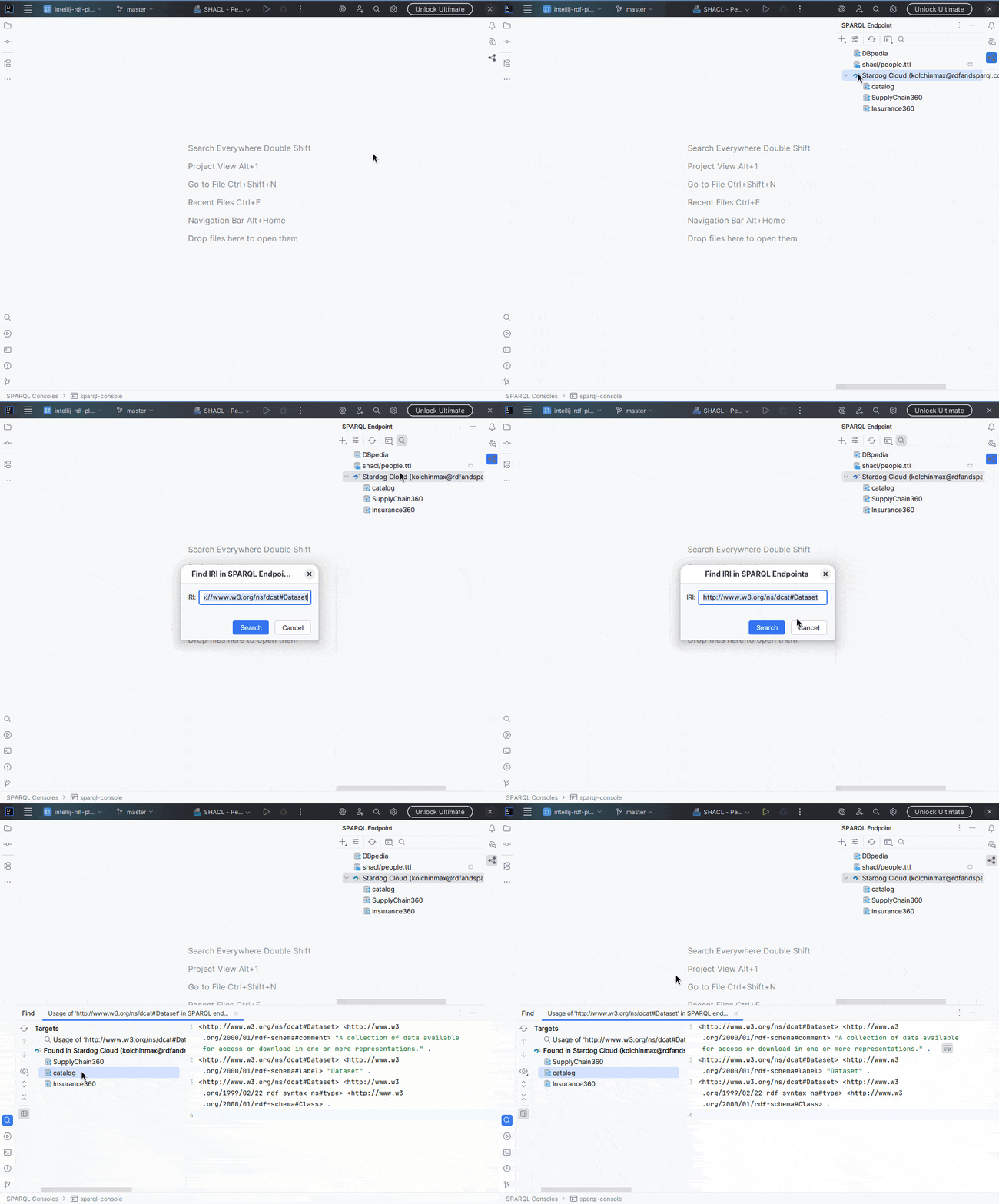
In the Find Tool Window, you'll see a list of SPARQL endpoints where the given IRI has been located. The Preview pane will display the output of a DESCRIBE query, giving you an immediate description of the IRI.
It's important to note that a DESCRIBE query typically shows triples where the IRI is in the subject position. However, our search is more comprehensive—it takes into account the subject, predicate, and object positions. This means you might find an IRI in the search results that doesn't show any triples in the Preview pane, as it may only appear in the predicate or object position.
Saves time and increases productivity
Imagine you need to find information about a specific person, company, or biological entity, and you have multiple public or private SPARQL endpoints where it could potentially be located. Normally, this process could take minutes or even an hour, as you would have to manually write and execute a SELECT or ASK query against every single endpoint.
Our new feature saves a significant amount of work for busy data and knowledge engineers who manage multiple SPARQL endpoints. It frees up your time for more engaging and productive tasks, turning a tedious chore into a single-click action.
Conclusion
The "Find a given IRI in SPARQL endpoints" feature in the RDF and SPARQL plugin is more than just a search tool; it's a significant time-saver. By automating a task that was once tedious and manual, it helps you stay focused on your core work. You can now spend less time writing repetitive queries and more time exploring and building with your data.
Download the plugin today and streamline your workflow. It's time to stop searching for IRIs and start using them.